How to Use This Template
- Record every search you make, even if you find nothing.
- Note exact source names and repository details so you can cite them later.
- Log negative results — they save you searching the same source twice.
- Keep one log per surname or research project to stay organised.
About This Template
A genealogy research log is one of the most important tools in a serious researcher's kit — and one of the most overlooked. The log records every source you search, the date you searched it, what you were looking for, and what you found (or did not find). This matters because genealogy research involves searching dozens or hundreds of sources over months or years. Without a log, it is easy to forget which databases you have already checked, which years you have covered, and which searches came up empty.
Recording negative results is especially important. If you searched a particular parish register for a surname and found nothing, that information is just as valuable as a positive find — it tells you the person was not in that parish, which points your research in a different direction. A log entry for a search that found nothing saves you from repeating the same search two years later.
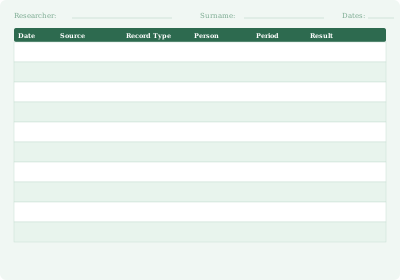
This template provides 18 rows per sheet, with columns for date, repository/source, record type, time period covered, search purpose, and result. Use one log per surname or per research project. A binder with pedigree charts, family group sheets, and research logs for each surname line is the standard genealogy research filing system.
What to Record in Each Column
- Date: When you conducted the search
- Repository / Source: The archive, website, or database searched (e.g., "FamilySearch — England Births 1837–1915")
- Record type: What type of record you were searching (birth certificates, census, electoral roll, etc.)
- Time period: The years covered by the search
- Purpose: What you were looking for (e.g., "birth record for Thomas Evans, about 1872")
- Result: What you found — a specific record, "not found", or the name of any related document you retrieved
Frequently Asked Questions
What is a genealogy research log used for?
A genealogy research log records every source you search during family history research — the date, the database or archive, what you were looking for, and what you found. It prevents you from repeating searches you have already done and provides a citation trail when you want to verify or share your findings. It is one of the most underused but most valuable tools in genealogy research.
Should I record searches that found nothing?
Yes — negative results are just as important as positive ones. If you searched a particular parish register for a name and found nothing, logging that tells you the person was not in that register (or not in the years you searched). Without a log entry, you may search the same source again years later. Recording "not found" with the date and parameters of your search saves significant time over a long research project.
How many research logs do I need?
Most genealogists keep one log per surname line or per research project. If you are actively researching your maternal grandmother's line, start a dedicated log for that surname. When you move to a different line, start a new sheet. A binder with separate tabbed sections per surname — each containing a pedigree chart, family group sheets, and research logs — is the standard genealogy filing system.
What Australian sources should I log first?
For Australian research, the key sources to search and log early are: state BDM (Births, Deaths and Marriages) registries for vital records; Trove for digitised newspapers with birth, marriage and death notices; the National Archives of Australia for Commonwealth records; and FamilySearch for indexed Australian records. The Australian Family History Research Checklist pairs well with this log to ensure you cover every major source.