How to Use This Template
- Click the button above to open the template in your browser.
- Print on A4 paper in landscape orientation, or use File → Print → Save as PDF.
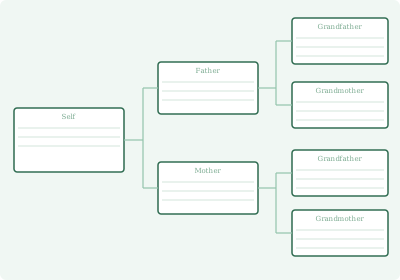
- Start with yourself in the box on the left side of the chart.
- Fill in your parents in the centre column and your grandparents on the right.
About This Template
The 3-generation pedigree chart is the most accessible entry point into standard genealogy record-keeping. It shows three generations of direct ancestors — yourself on the left, your two parents in the centre column, and your four grandparents on the right side of the page. The landscape A4 format keeps all three columns visible at once without requiring you to turn the page.
Unlike a portrait family tree, the pedigree chart shows only your direct ancestry line — no siblings, no cousins, no extended relatives. This focus is deliberate. Genealogists use pedigree charts because they make gaps in your research visible at a glance. Any empty box on the right side of the chart is an ancestor you have not yet identified — a clear goal for your next research session.
This format pairs well with the Family Group Sheet, which captures detailed information about each couple. Use the pedigree chart to track who your ancestors are, and family group sheets to record everything you know about each family unit. Together, these two templates form the backbone of a well-organised genealogy research system.
Tips for Completing a Pedigree Chart
- Record women's maiden names. Always use a woman's birth surname on a pedigree chart, not her married name. This is the standard genealogy convention and makes future research significantly easier.
- Include birth, marriage, and death dates. Where space allows, add dates and places for each event. Even approximate dates like "about 1910" are worth recording — they give you a time frame for your research.
- Use pencil first. Pedigree charts often need corrections as you verify facts or find new information. Working in pencil lets you update without the page becoming messy.
- Number your charts. If your research expands beyond one chart, number them and link them by noting the chart number where an ancestor's line continues.
Frequently Asked Questions
What is a pedigree chart?
A pedigree chart shows your direct-line ancestors — no siblings or extended family. You appear on the left, with parents in the centre column and grandparents on the right. It is the standard format used by genealogists because it makes your research gaps immediately visible.
What is the difference between a pedigree chart and a family tree?
A portrait family tree typically includes siblings, spouses, and extended relatives. A pedigree chart shows only direct ancestors, displayed horizontally. Pedigree charts are preferred for genealogy research; portrait family trees are better for display purposes.
Which size should I use — 3-generation or 4-generation?
The 3-generation chart suits beginners or anyone whose research only goes back to grandparents. If you already know your great-grandparents' names, the 4-generation pedigree chart is the standard format used for active genealogy research.